Everything a club runs on, in one place.
Scheduling, registration, waitlists, invoicing, e-Transfer matching, automatic payments, a family account and your own website. Here is what each one actually does, and the decision that shaped it.
Build a class once. Every session follows.
Set the program, location, floor area, coach, day, time, season and price, and Gympillar generates every session it runs. Capacity is tracked per class, and the spots a parent sees are the spots that actually exist.
- Seasons roll a whole timetable forward, instead of rebuilding it every September
- Capacity tracked per class, with spots left shown live on your site
Won’t save a clash. A class that double-books a coach or a floor area is refused. The check runs against the timetable as it would be after the save, so a changed time is caught as well as a new class.

Families register themselves.
Parents sign up from your own website, or your staff enrol them from the class page while a parent is on the phone. Both take the same path, so a spot can never be handed out twice.
- A full class waitlists rather than refuses
- The next family is promoted, emailed and given a held spot with an expiry
- Every session has a register, and coaches see only the classes they teach, with allergies, medical notes and emergency contacts beside each name
Registration holds a spot and charges nothing. Invoicing is a separate step, which is what lets a club take an e-transfer, cash,a card, a bank debit, cash, or nothing at all for a make-up class.

Forty families billed in one press.
Invoice one family, or issue the same charge to a whole group as separate invoices in a single action. Tax is captured per line when the invoice is issued, so changing a rate later never rewrites a bill a family has already seen.
- Recurring invoices raise, email and chase themselves every month
- Saved cards or bank accounts are collected on the due date; the household is told before the first collection and can switch it off from its own billing page
- A declined card is retried after three days and seven more, and the club is told each time
Every amount is held in whole cents. A $320.00 invoice can never record as $319.999… and read as unpaid to a parent who paid in full.

No more Sunday evening with the spreadsheet.
Gympillar reads your deposit notification emails and matches each one to the invoice it pays. Anything that isn’t a certain match is put in front of a person, one click to confirm.
Never matched on amount alone. Two families paying $320 on registration day would cross-match. It needs nothing from your bank: Gympillar reads the deposit emails your bank already sends. Every transfer is still sent by the family, since nothing can pull one, so this is bookkeeping automation rather than a payment integration. How e-Transfer matching works, in full.

No more Sunday evening with the spreadsheet.
Families save a card or a bank account once, and Gympillar collects each bill on its due date. Anything that fails is put in front of a person, with the reason beside it.
Nobody is charged without notice. Families are told before each collection, and a family can stop automatic payments from their own account at any time. Payments run through Stripe in US dollars, and every one shows against its invoice.
A real site, not a booking widget.
Programs, timetable, coaches, photos and self-serve registration, built from sections you arrange, at yourclub.gympillar.com or a domain you already own, in a design you pick and can change any time.
- Server-rendered, so search engines and social previews see the whole page
- Prices and spots left come from the same records as the register
No placeholder copy. Identical sentences across hundreds of club sites is what buries them in search, so a layout picks the shape and you write the words.

Parents look it up themselves.
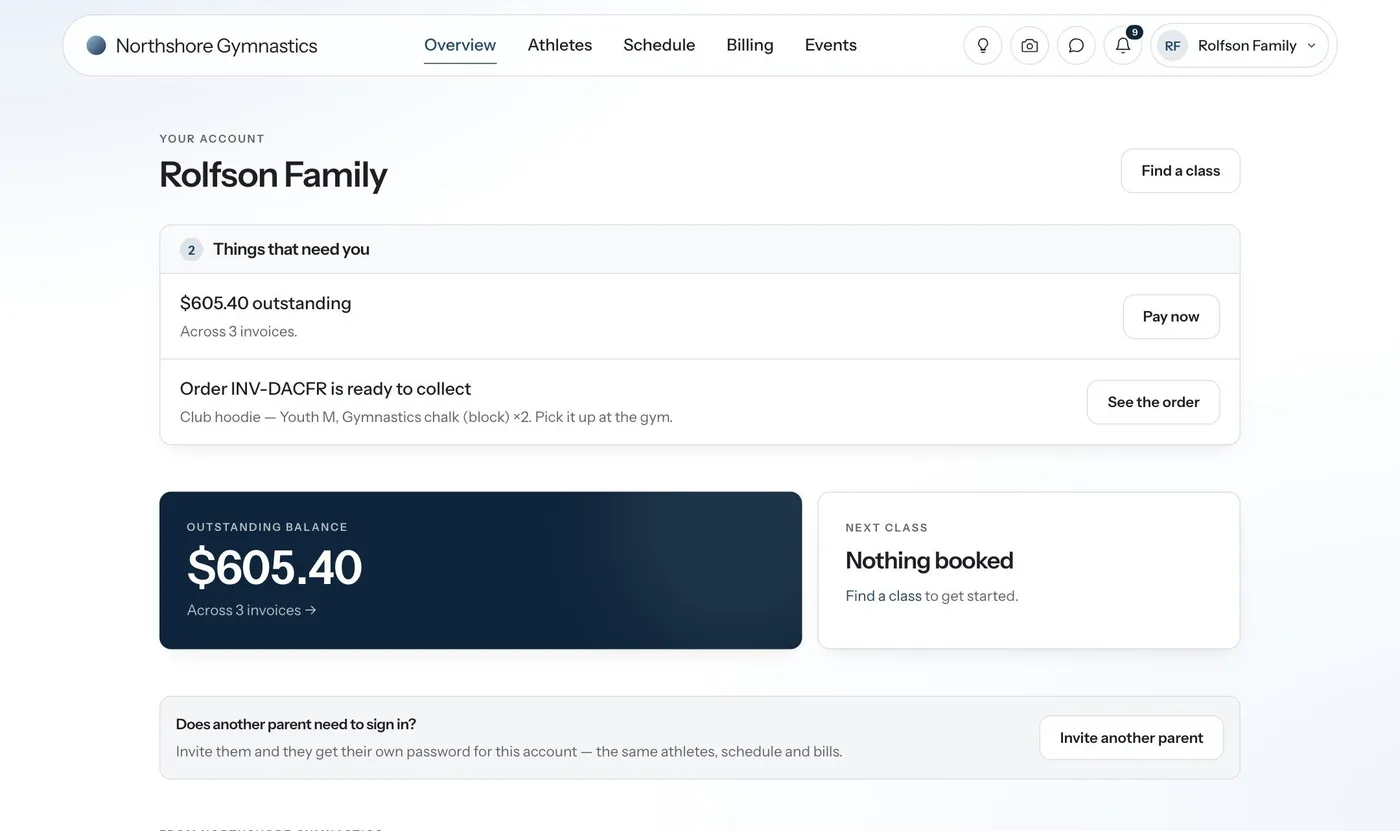
Registering a child creates the family’s account on your own website. They sign in to see their children’s classes and schedule, pay invoices, sign your paperwork and message the club.
- A second parent gets a sign-in of their own
- Optional two-step verification at sign-in
- Nobody at the club ever sees or types a family’s password
- Account pages are never cached or indexed, and never pass their address on to another site
On every plan, at no extra cost.
The plan sizes your club, not the product. The shop and birthday parties come with Club and Academy, or as an add-on.
Messaging with families
One conversation per family, group messages to a class or a season, in your own wording from your own domain.
Waivers and e-signed documents
Terms, privacy and waiver ready to edit, plus PDFs signed online and stored against the child.
Levels and skills
Your grading ladder and the skills each level asks for, ticked on the register and shown to parents when you choose.
Marketing
Your Google listing’s reviews and traffic in one place, and where you rank in search and in AI answers.
Discounts, done for you
Second-child rates applied automatically, codes for your promotions, and standing arrangements for a family.
Multiple locations
Two gyms, one account. A manager at one building sees only that building’s classes and families.
Events and gradings
Invite everyone ready for grading day. Each yes adds the entry fee, and a pass moves them up a level.
Private lessons
A coach publishes their free hours. Families book a private lesson and pay for it online.
Club shop and birthday parties
Leotards and grips on your own site, and party packages booked into the times you actually have free.
Club and Academy, or an add-onWhat clubs ask us.
Does Gympillar collect Interac e-Transfers automatically?
Yes. Families send the transfer the way they always have, quoting the reference on their invoice. Gympillar reads the deposit notification, matches it to the right invoice and marks it paid, and the spot is confirmed without anyone at the desk touching it.
Who sees a child’s medical notes?
The coaches who teach that child’s class, and your owners and admins. Each coach gets the register for their own classes, with allergies, medical notes and emergency contacts right there.
What happens when a class is full?
The family is waitlisted. When a spot frees up the next family is promoted and emailed automatically, with the spot held and the expiry stated.
Can our club use its own domain?
Yes. Point a domain you already own at your Gympillar site, or use yourclub.gympillar.com. Both serve the same pages.
Can families pay monthly by e-Transfer?
Yes. Gympillar sends the invoice every month and matches each transfer as it lands. Families who would rather not send anything can save a card or a bank debit, and each month is paid automatically. How the matching works.
Can families pay monthly?
Yes. Gympillar sends the invoice every month. Families can save a card or an ACH bank debit, and each month is collected automatically on its due date.
Still have a question?
Ask us on a demo call, and you’ll talk to the people who built it.